Posts

Showing posts with the label blogging

20 TOP ALEXA SITE

Google google.com Enables users to search the Web, Usenet, and images. Features include PageRank, caching and translation of results, and an option to find similar pages. The company's focus is developing search technology. Yahoo! yahoo.com Personalized content and search options. Chatrooms, free e-mail, clubs, and pager. Facebook facebook.com A social utility that connects people, to keep up with friends, upload photos, share links and videos. YouTube youtube.com YouTube is a way to get your videos to the people who matter to you. Upload, tag and share your videos worldwide! Windows Live live.com Search engine from Microsoft. Wikipedia wikipedia.org An online collaborative encyclopedia. Blogger.com blogger.com Free, automated weblog publishing tool that sends updates to a site via FTP. Microsoft Ne...

KONTES DESIGN BANNER KLIKSAYA.COM

Latar Belakang Dunia cyber Indonesia telah berkembang begitu pesatnya. Hal ini terlihat dari begitu banyaknya situs-situs serta blog Indonesia. Bahkan sudah banyak situs yang menggunakan Bahasa Indonesia. Sayangnya dari sisi design tampilan situs, masih banyak yang kurang bernuansa Indonesia. Mengapa? Salah satu penyebabnya adalah karena kita masih kesulitan dalam hal mendapatkan foto-foto bagus yang bernuansa Indonesia untuk ditaruh pada situs kita. Oleh karena itu dalam kesempatan ini perkenankan kami memperkenalkan situs baru kami, AsiaPhotoPro.Com , yang berfungsi sebagai penyedia stok foto bernuansa Asia dengan harga yang sangat terjangkau. Dengan keberadaan situs AsiaPhotoPro.Com , kita harapkan dunia cyber Indonesia dapat dengan lebih mudah mendapatkan foto berkualitas tinggi dengan nuansa lokal sehingga dari sisi tampilan situs lebih sesuai dengan kebudayaan kita. Bekerja sama dengan sponsor utama kami, AsiaPhotoPro.Com , dalam kesempatan ini kami ...

FREE LEARNING, MY NEW BLOG

I like to learn many thing in internet. I like study about writing, blogging, template, business, Tips and Trick SEO, and others. In Internet we can find many free tutorials, We don't have to pay for those tutorials. Free thing always be my top list. So, I write that in my new blog, Free Tutorial . I want to give information to other about many site Which good for me. It can be useful for other people. Do you Have a website, especially freebies website or blog? I will review about your site if I think that site is useful. hehehe...

USE YOUR FACEBOOK TO PROMOTE YOUR BUSSINESS

Image
Facebook is the biggest social networking in the world. You will get very crowded traffic from here if use their tools. You may advertise there, but do you know? Facebook can give you traffic for free and has good tools for brand your site and business. Now I will give information about tools in facebook which I use (exactly free). I use it for increase traffic and expand my community. I don't pay them for tools I used. #1. Page Page is profile page which special for promote your product or website. With page, you can explain about your product and market your product for free (except you want to advertise here to get more fans). You can have your private profile and pages. If you have many friends you can invite all of them to be fans of your profile. You also can add fans box to your site. You can tell people how many people be your fans, so they will interest to your business. I think this is cheap marketing. Many blogger use this way to promote their blog. With good faceboo...

BE CAREFULL TO USE SHOUTMIX WIDGET

Image
I like to put shoutmix chat widget in my blog (but not for this blog). I was very surprised when someone tell me how to hack shoutmix chat widget. Why they hack shoutmix chat widget? Because they can write in our widget without visit our blog. Be careful!!! I will tell you how can they hack it. First, klik admin in shoutmix chat widget you will face this page below. After that, delete "=admin" in url box. klik to see clearly Now you get the shoutbox chat widget url. You only need go to this url to shout, without visit the blog.

USING REL="NOFOLLOW" TO SAFE YOUR LINK

Link is very important for site. If our site has outbound link more than inbound link , it can decrease Pagerank . Sometime we need linking to other website but this website doesn't need link anymore, like wikipedia, google, yahoo, facebook and other. I usually use rel="nofollow" for affiliate program and other source which related with my post. And exactly for sites which don't need link anymore. You will see that this small think can safe your link better. Rel="nofollow" tell google spider to not count that link as outbound link. So this won't give velue for the site we linked. And how to insert rel="nofollow" to our link. You only do this simple thing. The usual link : <a href="http://bestnarsis.blogspot.com">Not Important Diary</a> or <a href="http://bestnarsis.blogspot.com" target="_blank">Not Important Diary</a> Insert rel="nofollow" like this <a href="http://bestn...

GIFT FROM GOOGLE

Image
I surprised when look at my pagerank banner (the most bottom widget). Google give me pagerank (3) . I never thought that this new site can reach pagerank (3) . My other blog, Kamus pengetahuan only reach pagerank (1) since it's launched whereas it has more visitors each day. My site Cerpen Kita , has less than 10 visitors each day and long time was not updated. But, it has google pagerank (2).Such a weird assessment. What the caused??? Google Pagerank still mysterious. Nobody exactly know how google rate the site and give google pagerank to that. There is some possibility, template, links to site, amount of page, frequently update (maybe), and I think of one more reason, "follower". Not only google follower , but also other follower, like follower from blogged, blogcatalog, networked blog, and mybloglog. I saw that popular site in this site directory has good pagerank . I get other theory to increase pagerank , those things below are some thing you should do to get go...

SHOW RECENT COMMENT AND RECENT POST

Image
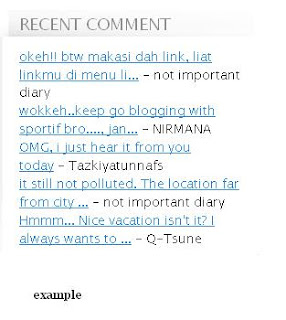
Some time reader know our blog because find our old post. offering reader to read our new post need recent post widget. Sometime reader comment our old post too, to know that we can use recent comment to search (actually we can know that with set blog to send email when new comment take. To show recent comment and recent post we can use feed widget . this is the most simple way. we only click add page element and type our post feed or comment feed url then finish. This is the way : #1. Log in to your blogger account #2. Go to layout #3. Click add page element, choose feed. #4. Type this url : http:// yourblog .blogspot.com/feeds/posts/default (for recent post) http:// yourblog .blogspot.com/feeds/comments/default (for recent comment) #5. Set your setting #6. Finish

BLOGGER CONTEST

Image
Do you look for blogger contest? Now days, there is so many blogger contest in Indonesia. There is two kind of contest, first, SEO contest and second Non SEO contest . I will give you list of the contest I ever read. This is list of SEO Contest : 1. Wisata SEO Sadau Contest - Keyword : "Wisata SEO Sadau" - Search Engine : Google.co.id - Deadline : 17 August 2009 - Prize : First Winner : Rp 500.000,00- Second Winner : Rp 300.000,00- Third Winner : Rp 100.000,00- Harapan Pertama : Rp 50.000,00- Harapan Kedua : Rp 50.000,00- - More Info : http://bisnis5online.blogspot.com/ 2009/03/kontes-wisata-seo-sadau.html 2. SEO Tukang Nggame Contest - Keyword : "Tukang Nggame" - Search Engine : Google.com - Deadline : 1 July 2009 - Prize : First Winner : Rp. 1,500,000 Second Winner : Rp. 1,000,000 Third Winner : Rp. 500,000 - More Info : http://yudhis97.net 3. Aristia Wida Rukmi Seo Contest - Keyword : "Kontes SEO aristia wida Rukmi" - Search Engine : Google.co.id - De...

SEO FRIENDLY TITLE

I have tried to change my blog to SEO friendly title blog (blog which has SEO friendly title), but poor me I got failure. I didn't success when copy code and insert that code to my html. But now my blog can be SEO Friendly title blog , I got the right code in Panca Blog We can change our blog title to SEO friendly blog title by avoid duplicate title in our blog. Example : # Your home --> Not Important Diary ## Your page --> Not Important Diary : SEO Friendly title (italic font is duplicate value) To Avoid it we can change our html code. We can replace this code : <title><data:blog.pagetitle/></title> (this code usually under code <head>) replace that code to this code : <b:if cond='data:blog.pageType == &quot;index&quot;'> <title><data:blog.title/></title> <b:else/> <title><data:blog.pageName/></title> </b:if> After do that you can found no duplicate title in your blog

MAKE READ MORE IN NEW BLOGGER

I use read more to hide part of my posting. Too long post look like bored posting. Readers don't like it. We can offer more of our post to readers too, readers don't have to scroll so long. Beside that, without using read more, our blog is being indicated has duplicate post. It isn't good for you page rank How to insert read more to your blog? #1. Log in to your blogger account #2. Go to Layout--> edit html #3. Check Expand Template widget #4. Copy this code above code </head> <style> <b:if cond='data:blog.pageType == "item"'> span.fullpost {display:inline;} <b:else/> span.fullpost {display:none;} </b:if> </style> #5. Copy this code under code <p><data:post.body/></p> <b:if cond='data:blog.pageType != "item"'> <a expr:href='data:post.url'> Read More..</a> </b:if> #6. Save your template #7. When you post something use edit html Insert this code in ...

USE SHOW HIDE SPOILER

I can't give you the best description about hide show spoiler . This is the example of hide show spoiler My Name Is hide show spoiler We can use hide show spoiler for hiding some part of our post. I like to do that if write post which include list or codes. I want this list and codes don't disturb reader. Do you want use hide show spoiler? This is the code: <div id="spoiler"><div><input value="Show Spoiler!" style="margin: 10px; padding: 0px; width: 100px; font-size: 12px;" onclick="if (this.parentNode.parentNode.getElementsByTagName('div')['show'].style.display != '') { this.parentNode.parentNode.getElementsByTagName('div')['show'].style.display = ''; this.parentNode.parentNode.getElementsByTagName('div')['hide'].style.display = 'none'; this.innerText = ''; this.value = 'Hide Spoiler!'; } else { this.parentNode.parentNode.getEl...

INSERT RELATED POST UNDER YOUR POST

Related post can increase you page view. When readers exited to one of your post they may exited to your other post in related category. You can offer your other article in same category by do this thing. How to do? Let's we see. #1 Log in to your blogger account #2 Go to layout #3 Click Edit html #4 Search this code data:post.body/ #5 Copy this code below after that code <b:if cond='data:blog.pageType == "item"'> <div class='similiar'> <div class='widget-content'> <h3>Related Posts by Categories</h3> <div id='data2007'/><br/><br/> <script type='text/javascript'> var homeUrl3 = &quot;<data:blog.homepageUrl/>&quot;; var maxNumberOfPostsPerLabel = 4; var maxNumberOfLabels = 10; maxNumberOfPostsPerLabel = 100; maxNumberOfLabels = 3; function listEntries10(json) { var ul = document.createElement(&#39;ul&#39;); var maxPosts = (json.feed.entry.length &lt;...

HOW TO SHOW HTML CODE IN YOUR POST

Image
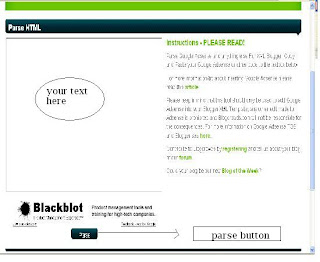
Do you get a problem to insert (show) your html code in your post? You want to show your tag like this code (maybe) <a href="http://bestnarsis.blogspot.com">Not ImportantDiary</a> Your code can't show, and you think hard why it happen. Do you know? You have to parse your code before insert it to your post. And how to do it? #1 You can visited this website to parse your html first. #2 Copy your code in the left box. #3 Click parse button #4 This website will process your code #5 Copy your new code Now you can show your html code.